

CSharp语言MCP服务器
项目介绍
Bifrost - VSCode 开发工具 MCP 服务器
<a href="https://marketplace.visualstudio.com/items?itemName=ConnorHallman.bifrost-mcp"> <img src="https://img.shields.io/visual-studio-marketplace/d/ConnorHallman.bifrost-mcp?label=VSCode%20Extension%20Downloads&cacheSeconds=3600" alt="VSCode Extension Downloads" width="250"> </a>此 VS Code 扩展提供了一个模型上下文协议(MCP)服务器,该服务器将 VSCode 强大的开发工具和语言特性暴露给 AI 工具。它支持使用支持 MCP 协议的 AI 编码助手进行高级代码导航、分析和操作能力。
目录
功能
- 语言服务器集成:访问 VSCode 的语言服务器功能,适用于任何受支持的语言
- 代码导航:查找引用、定义、实现等
- 符号搜索:在工作区中搜索符号
- 代码分析:获取语义标记、文档符号和类型信息
- 智能选择:使用语义选择范围进行智能代码选择
- 代码操作:访问重构建议和快速修复
- HTTP/SSE 服务器:通过一个兼容 MCP 的 HTTP 服务器暴露语言特性
- AI 助手集成:准备好与支持 MCP 协议的 AI 助手一起工作
使用
安装
- 从 VS Code 市场安装 扩展
- 安装您开发所需的语言特定扩展
- 在 VS Code 中打开您的项目
配置
激活时,扩展会自动启动 MCP 服务器。要配置 AI 助手以使用此服务器:
- 服务器默认运行在端口 8008 上(可通过
bifrost.config.json配置) - 配置您的兼容 MCP 的 AI 助手连接到:
- SSE 端点:
http://localhost:8008/sse - 消息端点:
http://localhost:8008/message
- SSE 端点:
大型语言模型规则
我还提供了可以在 .cursorrules 文件中使用的示例规则,以获得更好的结果。
Cline 安装
- 第一步:安装 Supergateway
- 第二步:添加配置到 cline
- 第三步:虽然会显示红色但似乎可以正常工作
Windows 配置
{
  "mcpServers": {
    "Bifrost": {
      "command": "cmd",
      "args": [
        "/c",
        "npx",
        "-y",
        "supergateway",
        "--sse",
        "http://localhost:8008/sse"
      ],
      "disabled": false,
      "autoApprove": [],
      "timeout": 600
    }
  }
}
Mac/Linux 配置
{
  "mcpServers": {
    "Bifrost": {
      "command": "npx",
      "args": [
        "-y",
        "supergateway",
        "--sse",
        "http://localhost:8
008/sse"
      ],
      "disabled": false,
      "autoApprove": [],
      "timeout": 600
    }
  }
}
Roo Code 安装
- 第一步:在全局或基于项目的 MCP 配置中添加 SSE 配置
{
  "mcpServers": {
    "Bifrost": {
      "url": "http://localhost:8008/sse"
    }
  }
}
按照这个视频来安装并使用 cursor
对于新版本的 cursor,请使用以下代码
{
  "mcpServers": {
    "Bifrost": {
      "url": "http://localhost:8008/sse"
    }
  }
}
多项目支持
当处理多个项目时,每个项目都可以有自己的专用 MCP 服务器端点和端口。这在您有多个打开的 VS Code 窗口或正在处理需要语言服务器功能的多个项目时非常有用。
项目配置
在项目根目录创建一个 bifrost.config.json 文件:
{
    "projectName": "MyProject",
    "description": "您的项目描述",
    "path": "/my-project",
    "port": 5642
}
服务器将使用此配置来:
- 创建项目特定的端点(例如,
http://localhost:5642/my-project/sse) - 向 AI 助手提供项目信息
- 为每个项目使用专用端口
- 将项目服务与其他运行实例隔离
示例配置
- 后端 API 项目:
{
    "projectName": "BackendAPI",
    "description": "带有 TypeScript 的 Node.js REST API",
    "path": "/backend-api",
    "port": 5643
}
- 前端 Web 应用:
{
    "projectName": "FrontendApp",
    "description": "React 前端应用",
    "path": "/frontend-app",
    "port": 5644
}
端口配置
每个项目应指定其自己的唯一端口,以避免在运行多个 VS Code 实例时发生冲突:
bifrost.config.json文件中的port字段决定了服务器将使用的端口- 如果未指定端口,则默认为 8008 以保持向后兼容性
- 为不同的项目选择不同的端口,确保它们可以同时运行
- 如果配置的端口已被占用,服务器将无法启动,您需要:
- 释放该端口
- 更改配置中的端口
- 关闭使用该端口的其他 VS Code 实例
连接到项目特定端点
更新您的 AI 助手配置以使用项目特定的端点和端口:
{
  "mcpServers": {
    "BackendAPI": {
      "url": "http://localhost:5643/backend-api/sse"
    },
    "FrontendApp": {
      "url": "http://localhost:5644/frontend-app/sse"
    }
  }
}
向后兼容性
如果没有 bifrost.config.json,服务器将使用默认配置:
- 端口:8008
- SSE 端点:
http://localhost:8008/sse - 消息端点:
http://localhost:8008/message
这保持了与现有配置和工具的兼容性。
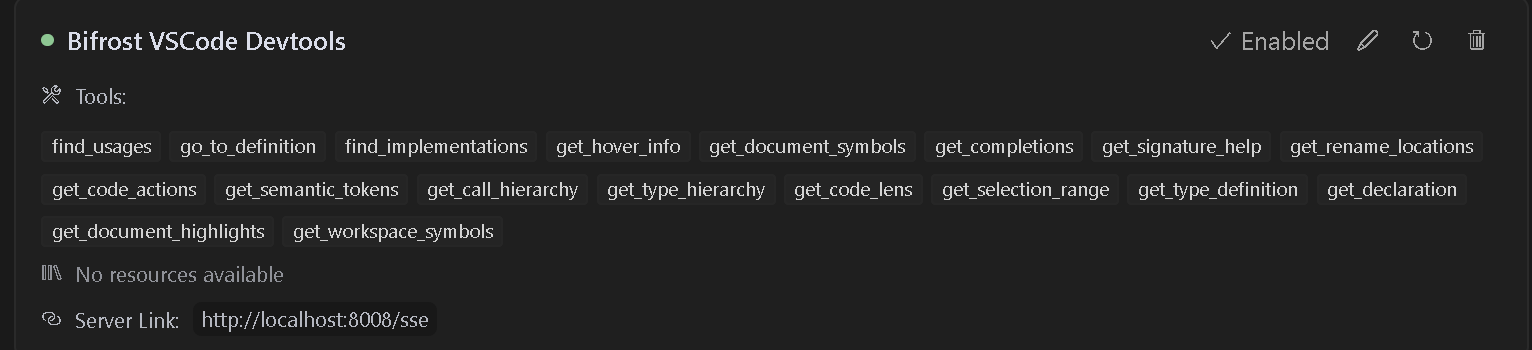
可用工具
扩展提供了对许多 VSCode 语言特性的访问,包括:
- find_usages:定位所有符号引用。
- go_to_definition:立即跳转到符号定义。
- find_implementations:发现接口/抽象方法的实现。
- get_hover_info:在悬停时获取丰富的符号文档。
- get_document_symbols:概述文件中的所有符号。
- get_completions:上下文感知的自动完成。
- get_signature_help:函数参数提示和重载。
- get_rename_locations:安全地获取项目中执行重命名的位置。
- rename:对符号执行重命名。
- get_code_actions:快速修复、重构和改进。
- get_semantic_tokens:增强的高亮数据。
- get_call_hierarchy:查看传入/传出调用关系。
- get_type_hierarchy:可视化类和接口继承。
- get_code_lens:内联见解(引用、测试等)。
- get_selection_range:代码块的智能选择扩展。
- get_type_definition:跳转到底层类型定义。
- get_declaration:导航到符号声明。
- get_document_highlights:突出显示符号的所有出现。
- get_workspace_symbols:在整个工作区中搜索符号。
要求
- Visual Studio Code 版本 1.93.0 或更高版本
- 您想要工作的语言的适当语言扩展(例如,C# 文件的 C# 扩展)
可用命令
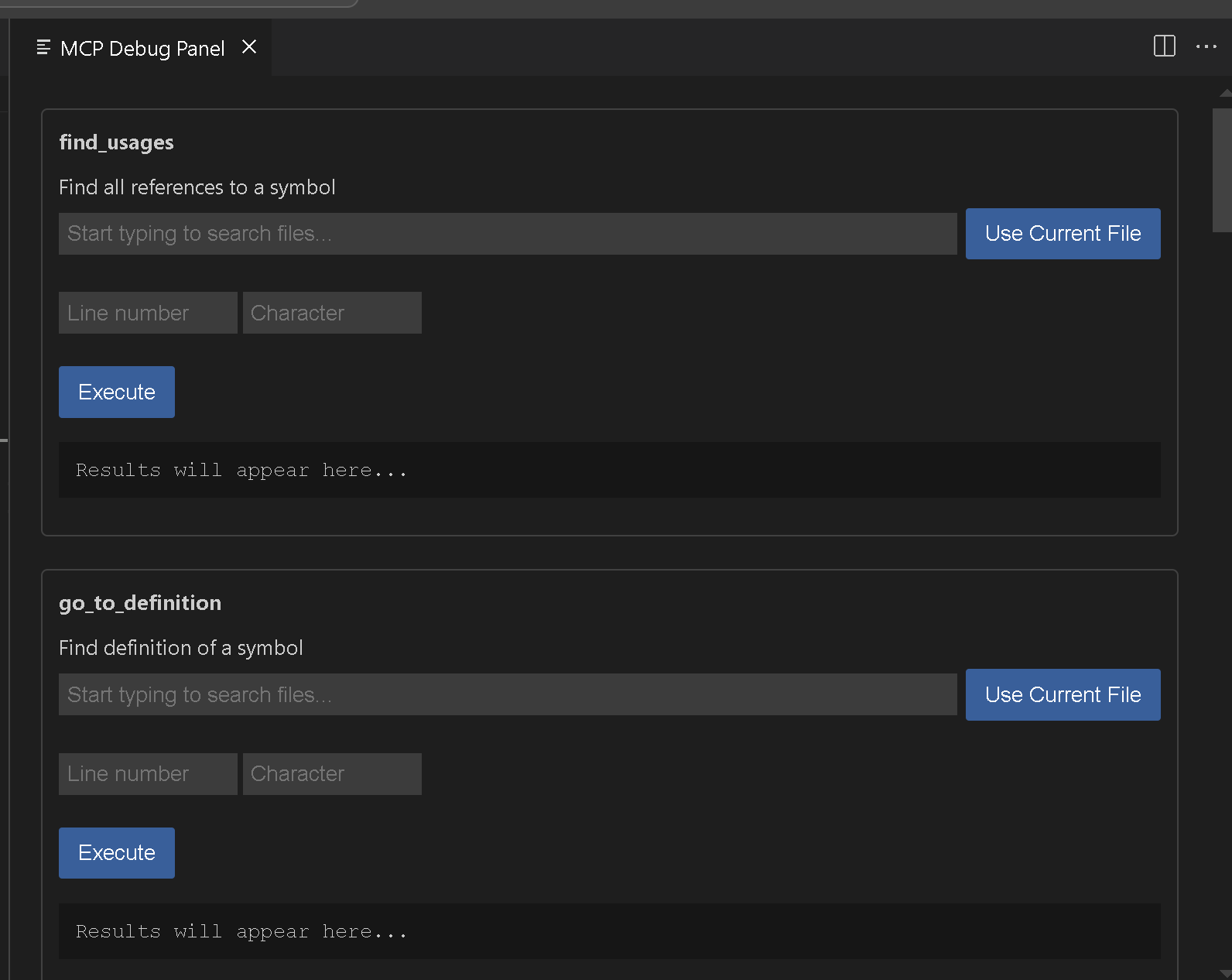
Bifrost MCP: Start Server- 手动在端口 8008 启动 MCP 服务器Bifrost MCP: Start Server on port- 手动在指定端口启动 MCP 服务器Bifrost MCP: Stop Server- 停止运行的 MCP 服务器Bifrost MCP: Open Debug Panel- 打开调试面板以测试可用工具
星星历史
示例工具使用
查找引用
{
  "name": "find_usages",
  "arguments": {
    "textDocument": {
      "uri": "file:///path/to/your/file"
    },
    "position": {
      "line": 10,
      "character": 15
    },
    "context": {
      "includeDeclaration": true
    }
  }
}
工作区符号搜索
{
  "name": "get_workspace_symbols",
  "arguments": {
    "query": "MyClass"
  }
}
故障排除
如果您遇到问题:
- 确保已为您的项目安装了适当的语言扩展
- 检查您的项目是否已在 VSCode 中正确加载
- 验证系统上端口 8008 是否可用
- 检查 VSCode 输出面板中的任何错误消息
贡献
这里有一些 VSCode 命令,如果您想添加额外的功能,请随意。我认为我们仍然需要重命名和其他一些功能。 请随时提交问题或拉取请求到 GitHub 仓库。
vsce package
调试
使用 MCP: Open Debug Panel 命令
许可证
此扩展程序根据 APGL-3.0 许可证授权。